Data Management Glossary
Storage Vendor Lock-In
What Is Storage Vendor Lock-In?
Storage vendor lock-in is the cost and effort required to leave a storage platform once your data depends on that vendor’s proprietary formats, tiering, licensing or services. The higher the exit cost, the less leverage you have at renewal and refresh time.
Lock-in is not unique to storage. In a 2026 survey of 540 IT professionals, 94% said they are concerned about vendor lock-in, and nearly half said they are very concerned.
Source: Parallels 2026 State of Cloud Computing Survey
Storage lock-in is harder to see than software lock-in. It rarely appears in a contract. Instead, it builds up inside the data itself, one tiering policy and one proprietary feature at a time.
How Storage Vendor Lock-In Happens
Most storage lock-in comes from a handful of mechanisms. Each one looks reasonable on its own. Together, they make leaving expensive.
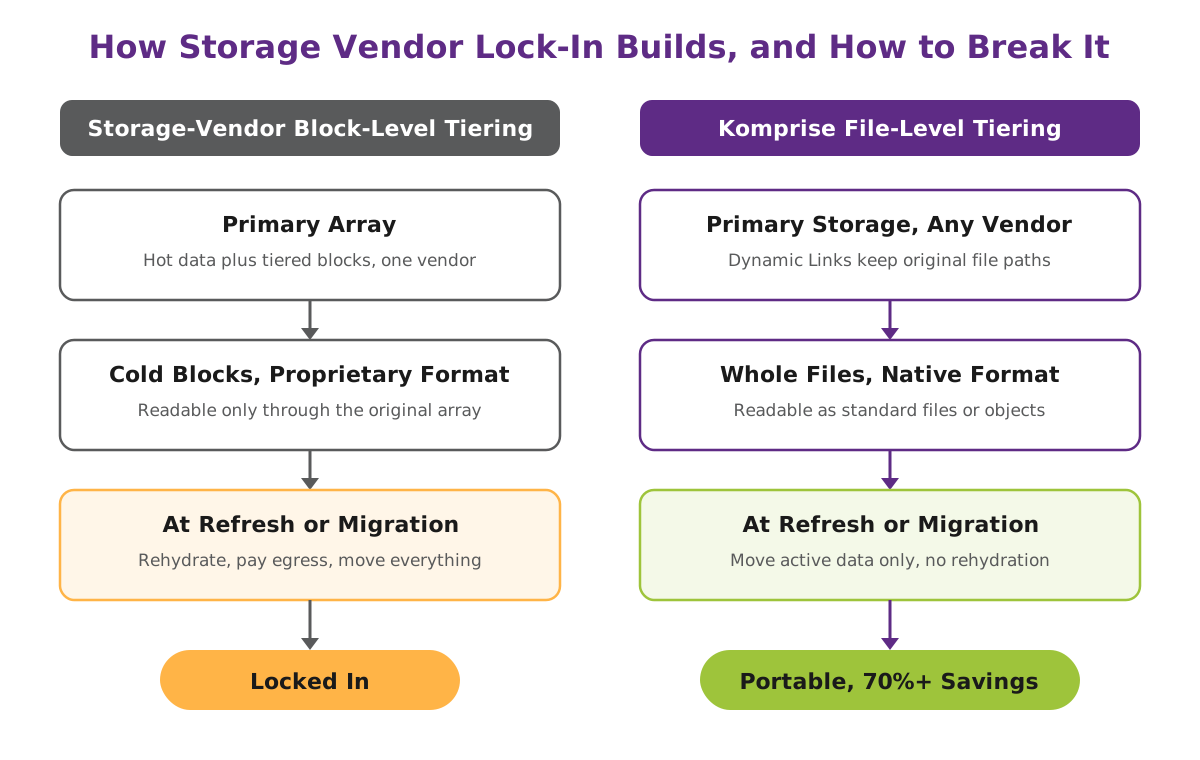
Proprietary tiering formats. Block-level tiering moves cold blocks, not whole files, to cheaper storage. The tiered data can only be read through the original array. NetApp FabricPool and Dell PowerScale CloudPools are common examples.
Rehydration. Before you migrate, back up or decommission a system that uses block-level tiering, you must recall the tiered data to the primary tier. That recall needs primary capacity, time and often cloud egress. See Rehydration.
Egress and access fees. Cloud and object storage charge to read or move data out. The 2026 Wasabi Global Cloud Storage Index found that 50% of cloud storage spend goes to fees, not capacity. See Egress Costs.
Source: Wasabi 2026 Global Cloud Storage Index, Business Wire
Licensing tied to hardware. Data services, snapshots and tiering are often licensed per array or per terabyte on one platform. Moving the data means rebuying the capability.
Vendor-specific data services. Storage vendors now offer search, analytics and AI data services. These are built primarily around data on the vendor’s own platform. As a result, the more workflows you build on them, the deeper the lock-in. See NetApp AI Data Engine (AIDE).
Migration risk. Moving petabytes of file data with permissions, paths and applications intact is slow and risky without the right tools. That risk alone keeps many organizations on a platform longer than they want. See Data Migration.
Why Lock-In Is Harder to Escape with Unstructured Data
Structured data lives in databases with defined schemas and standard export tools. Unstructured data does not. It is billions of files and objects spread across NAS, object storage and cloud, with no common schema and inconsistent naming.
Scale makes the problem worse. The Komprise 2026 State of Unstructured Data Management report found that 74% of storage leaders store more than 5 PB of unstructured data. Four in 10 store at least 10 PB. In addition, 53% name moving data without disruption as a technical challenge.
Source: Komprise State of Unstructured Data Management Report 2026
Most of that data is cold. According to Komprise customer data, 60% to 70% of NAS data has not been accessed in more than 90 days. When that cold data is tiered with a proprietary method, the largest share of your data estate becomes the hardest share to move.
Why Lock-In Costs More in 2026
Lock-in matters most when prices rise. Gartner forecasts NAND flash prices up 234% and DRAM up 125% in 2026, with no meaningful relief until late 2027. This price surge is often called Memflation.
Source: Gartner, April 8, 2026
At the same time, 85% of storage leaders expect storage spending to rise in 2026.
Source: Komprise State of Unstructured Data Management Report 2026
A locked-in customer has two choices at refresh: pay the incumbent’s price for new capacity, or pay to rehydrate and migrate before switching. Either way, the vendor sets the terms. See Storage Refresh and All-Flash Array (AFA).
How to Avoid Storage Vendor Lock-In
The goal is not to avoid storage vendors. It is to keep your data independent of any one of them. Five practices make the difference:
- Tier at the file level, not the block level. Whole files in open formats stay readable without the source array. See File-Level Tiering.
- Keep data in native format at every tier. Data tiered to object storage should be readable as standard objects.
- Manage data from a layer above storage. A storage-agnostic index and policy engine works across every vendor you run, not just one.
- Model costs before a refresh. Know how much data is cold and what it would cost to move before you sign a quote.
- Separate AI data services from the array. Data preparation for AI should work on data wherever it lives.
How Komprise Keeps Unstructured Data Portable
Komprise Intelligent Data Management runs above storage, not inside it. It works across NAS, object and cloud storage from any vendor, so the data management layer does not change when the hardware does.
Visibility first. Komprise Analysis indexes file and object metadata across all storage into the Global Metadatabase. Deep Analytics then queries that index by share, file type, age, owner or access time to show what is cold and where it lives.
File-level tiering with no proprietary format. Transparent Move Technology moves whole files, not blocks, to lower-cost storage. The tiered data stays in the target’s native format, so data tiered to Amazon S3 is readable as standard S3 objects without the source array. Komprise Dynamic Links keep files accessible at their original paths, with no stubs and no agents. Transparent Move Technology cuts storage, backup and DR costs by 70% or more with no rehydration penalty.
Switch vendors without rehydrating. Because tiered data stays in native format, you can migrate primary storage or decommission an array without first recalling the cold data. Elastic Data Migration moves the active data: 27X faster for NFS migrations, and Komprise Hypertransfer delivers 25X faster SMB migrations.
Cost modeling before the refresh. Komprise Flash Stretch is an assessment that models how much primary capacity tiering would reclaim before a purchase. Komprise analytics and cost modeling help customers see savings before data moves.
Portable data for AI. Data tiered in native format is available to AI and analytics tools without a second migration. Smart Data Workflows and Deep Analytics Actions use saved Deep Analytics queries to find, tag and deliver the right files to AI pipelines. It does not matter which vendor stores them.
Storage Vendor Lock-In vs. Storage-Agnostic Data Management
| Evaluation Criteria | Without Storage-Agnostic Data Management | With Komprise |
|---|---|---|
| Tiering method | Block-level tiering moves pieces of files in a proprietary format | Transparent Move Technology moves whole files in the target’s native format |
| Access to tiered data | Readable only through the original array | Readable as standard files or objects, with Dynamic Links at the original paths |
| Storage refresh or migration | Rehydrate tiered data to primary storage before you move or retire the array | Migrate only active data; tiered data stays in place with no rehydration |
| Vendor coverage | One vendor’s arrays and its approved cloud targets | NAS, object and cloud storage from any vendor |
| Visibility | Per-array reports, no single view across vendors | Global Metadatabase indexes all storage; Deep Analytics queries it by age, type, owner and share |
| Cost leverage at refresh | Incumbent sets the price for new capacity | Komprise Flash Stretch models reclaimable capacity before a quote is signed |
| Savings | Savings offset by rehydration, egress and recall costs | 70%+ lower storage, backup and DR costs with no rehydration penalty |
| AI data access | AI data services built around one vendor’s platform | Smart Data Workflows find, tag and deliver files to AI across every vendor |
How Lock-In Builds and How to Break It
Frequently Asked Questions
What is storage vendor lock-in?
Storage vendor lock-in is the cost and effort required to leave a storage platform once your data depends on that vendor’s proprietary formats, tiering, licensing or services. It shows up as rehydration, egress fees, rebuying licenses and migration risk at refresh time. With unstructured data at petabyte scale, those exit costs often decide the next purchase.
How do I avoid storage vendor lock-in?
Keep your data independent of the hardware. Tier at the file level so cold data stays readable without the source array. Store data in native format at every tier. Manage data with a storage-agnostic layer that works across vendors. Finally, model cold data and migration costs before every refresh, not after.
How does block-level tiering create vendor lock-in?
Block-level tiering, used by features such as NetApp FabricPool and Dell PowerScale CloudPools, moves cold blocks to cheaper storage in a proprietary format. Only the original array can reassemble those blocks into files. To migrate, back up or retire that array, you must first rehydrate the tiered data to primary storage. See Block-Level Tiering and Rehydration.
What is the difference between block-level and file-level tiering?
Block-level tiering moves pieces of files and keeps them in a vendor format. File-level tiering moves whole files and keeps them in an open, native format. File-level tiered data stays readable without the source system, so it does not lock you in. See File-Level Tiering.
What does storage vendor lock-in cost at a storage refresh?
A locked-in customer either buys more capacity from the incumbent at the quoted price or pays to rehydrate and migrate tiered data before switching. With Gartner forecasting NAND flash prices up 234% in 2026, buying capacity for cold data is the most expensive option. Tiering cold data at the file level before the refresh reduces how much new flash you need. See Storage Refresh.
Is cloud storage a form of vendor lock-in?
It can be. Cloud and object storage charge egress and access fees to read or move data out. The 2026 Wasabi Global Cloud Storage Index found that 50% of cloud storage spend goes to fees rather than capacity. Keeping data in native format and managing it from a storage-agnostic layer keeps your options open across clouds. See Egress Costs.
Can I switch storage vendors without rehydrating tiered data?
Yes, if the data was tiered at the file level in native format. With Komprise Transparent Move Technology, cold data already sits on the target as standard files or objects. You migrate only the active data to the new array, with no rehydration of the tiered data.
How does storage vendor lock-in affect AI projects?
AI needs access to the right files wherever they live. Data locked in a proprietary tiering format or a vendor-specific data service is harder to find, curate and deliver to AI tools. A storage-agnostic index and native-format data let you prepare AI data across every vendor you run, without copying everything into one platform first.
How does Komprise prevent storage vendor lock-in?
Komprise Intelligent Data Management runs above storage and works across NAS, object and cloud from any vendor. Transparent Move Technology tiers whole files in native format with no stubs or agents, so tiered data stays readable without the source array. Customers cut storage, backup and DR costs by 70% or more with no rehydration penalty, and they can change primary storage vendors without recalling cold data. See Intelligent Tiering.
Where does storage vendor lock-in fit in an AI data platform?
Lock-in lives at layer 1 of an AI Data Platform, Storage and Data Sources. Komprise operates at layers 2 through 4: Metadata and Discovery, Classification and Governance, and Enrichment and Curation. Because those layers sit above storage, your metadata, policies and AI data workflows stay the same when the storage underneath changes.