Data Management Glossary
S3 Intelligent Tiering
What is intelligent tiering?
Intelligent tiering is the automated process of analyzing data usage patterns and moving inactive or cold data to lower-cost storage tiers while keeping active data on high-performance storage. This helps organizations optimize data storage costs without disrupting user access.
Why is intelligent tiering important now?
Intelligent tiering is increasingly important as organizations face rising flash storage costs, rapid unstructured data growth, tighter IT budgets, and growing demand for AI-ready infrastructure. Many enterprises discover that 60% to 80% of file data is inactive but still consuming premium primary storage.
How does intelligent tiering reduce storage costs?
By moving cold data off expensive NAS or all-flash storage to lower-cost object, cloud, or secondary storage, intelligent tiering can reduce primary storage expansion needs, lower backup and DR costs, and delay hardware refresh cycles.
What is the difference between storage tiering and Komprise intelligent tiering?
Traditional storage tiering is often tied to a specific vendor platform and may move proprietary blocks of data. Komprise uses storage-agnostic file-level tiering that preserves files, metadata, permissions, and transparent access across NAS, cloud, and object storage. This provides more flexibility and helps avoid vendor lock-in.
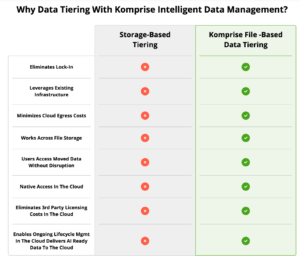
Learn more about Komprise Intelligent Tiering.
How does Komprise Intelligent Tiering work?
Komprise analyzes data across storage silos, identifies cold files based on customizable policies, and transparently moves them to lower-cost storage using patented Transparent Move Technology (TMT). Users continue accessing files from the original location without workflow disruption.
Can intelligent tiering help with AI initiatives?
Yes. Intelligent tiering helps free expensive high-performance storage for active AI workloads while making valuable unstructured data easier to identify, curate, and use in AI and analytics pipelines.
Does intelligent tiering impact application performance?
Not with Komprise. Komprise stays out of the hot data path, so active workloads are not impacted. Only rarely accessed cold files are retrieved when needed.
Learn more about the Komprise architecture.
What storage environments support Komprise Intelligent Tiering?
Komprise works across heterogeneous environments including NAS, object storage, cloud file services, and public cloud platforms such as Azure, AWS, and other leading storage vendors.
Komprise Data Storage Integrations.
What is Amazon S3 Intelligent Tiering?
S3 Intelligent Tiering is an Amazon cloud storage class. Amazon S3 offers a range of storage classes for different uses. S3 Intelligent Tiering is a storage class aimed at data with unknown or unpredictable data access patterns. It was introduced in 2018 by AWS as a solution for customers who want to optimize storage costs automatically when their data access patterns change.
Also see Intelligent Tiering.
Instead of utilizing the other Amazon S3 storage classes and moving data across them based on the needs of the data, Amazon S3 Intelligent Tiering is a distinct storage class that has embedded tiers within it. Data can automatically move across the four access tiers when access patterns change.
To fully understand what S3 Intelligent Tiering offers it is important to have an overview of all the classes available through S3:
Classes of AWS S3 Storage
- Standard (S3) – Used for frequently accessed data (hot data)
- Standard-Infrequent Access (S3-IA) – Used for infrequently accessed, long-lived data that needs to be retained but is not being actively used
- One Zone Infrequent Access – Used for infrequently accessed data that’s long-lived but not critical enough to be covered by storage redundancies across multiple locations
- Intelligent Tiering – Used for data with changing access patterns or uncertain need of access
- Glacier – Used to archive infrequently accessed, long-lived data (cold data) Glacier has a latency of a few hours to retrieve
- Glacier Deep Archive – Used for data that is hardly ever or never accessed and for digital preservation purposes for regulatory compliance

What is S3 Intelligent Tiering?
S3 Intelligent Tiering is a storage class that has multiple tiers embedded within it, each with its own access latencies and costs:
- It is an automated service that monitors your data access behavior and then moves your data on a per-object basis to the appropriate level of tier within the S3 Intelligent Tiering storage class.
- If your object has not been accessed for 30 consecutive days it will automatically move to the infrequent access tier within S3 Intelligent Tiering.
- If the object is not accessed for 90 consecutive days it will automatically move the object to the Archive Access tier and then after 190 consecutive days to the Deep Archive access tier.
- If an object is moved to the archive tier, the retrieval can take 3 to 5 hours and if it is in the deep archive tier it can take 12 hours.
- If the data is accessed from the deep archive tier, it will move back to the frequently accessed storage class.
What are the costs of AWS S3 Intelligent Tiering?
You pay for monthly storage, request and data transfer. When using intelligent tiering, you also pay a monthly per-object fee for monitoring and automation. While there is no retrieval fee in S3 Intelligent Tiering and no fee for moving data between tiers, you do not manipulate each tier directly. S3 Intelligent Tier is a bucket, and it has tiers within it that objects move through.
- Objects in the Frequent Access tier are billed at the same rate as S3 Standard.
- Objects stored in the Infrequent Access tier are billed at the same rate as S3 Standard Infrequent Access.
- Objects stored in the Archive Access tier are billed at the same rate as S3 Glacier.
- Objects stored in the Deep Archive access tier are billed at the same rate as S3 Deep Glacier.
What are the advantages of S3 Intelligent tiering?
The advantages of S3 Intelligent tiering are that savings can be made. There is no operational overhead, and there are no retrieval costs. Objects can be assigned a tier upon upload and then move between tiers based on access patterns. There is no impact on performance and it is designed for 99.999999999% durability and 99.9% availability over annual average.
What are the disadvantages of S3 Intelligent tiering?
The main disadvantage of S3 Intelligent Tiering is that it acts as a black box. You move objects into it and cannot transparently access different tiers or set different versioning policies for the different tiers. You have to manipulate the whole of S3 Intelligent Tier as a single bucket.
For example, if you want to transition an object that has versioning enabled, then you have to transition all the versions. Also, when objects move to the archive tiers, the latency of access is much higher than the access tiers. Not all applications may be able to deal with the high latency.
- S3 Intelligent tiering is not suitable for companies with predictable data access behavior or companies that want to control data access and versioning with transparency.
- Other disadvantages are that it is limited to objects, cannot tier from files to objects, the minimum object storage requirement is 30 days, objects smaller than 128kb are never moved from the frequent access tier and lastly, because it is an automated system, you cannot configure different policies for different groups.
S3 Data Management with Komprise
Komprise is an AWS Advance Tier partner and can offer intelligent data management with visibility, transparency and cost savings on AWS file and object data. How is this done?
Komprise enables analytics-driven intelligent cloud tiering across EFS, FSX, S3 and Glacier storage classes in AWS so you can maximize price performance across all your data on Amazon. The Komprise mission is to radically simplify data management through intelligent automation.
Komprise helps organizations get more value from their AWS storage investments while protecting data assets for future use through analysis and intelligent data migration and cloud data tiering.

Learn more at Komprise for AWS.
What is S3 Intelligent Tiering?
S3 Intelligent Tiering is an Amazon cloud storage class that moves data to more cost-effective access tiers based on access frequency.
How AWS S3 intelligent tiering works
S3 Intelligent Tiering is a storage class that has multiple tiers embedded within it. For a monitoring fee data is moved to optimize costs. Each tier with its own access latencies and costs:
- Frequent – data accessed within 30 days
- Infrequent – data accessed within 30-90 days
- Archive Instant Access – data accessed greater than 90 days
- Deep Archive Access – data not accessed for 180 days or greater (Optional*)
* Deep Archive Access: Also known as Glacier provides low cost with the tradeoff that data is not available for instant access. Retrieval time is within 12 hours and may cause time out condition for many applications. As such Deep Archive Access must be configured with the default configuration of S3 Intelligent Tiering
What are the advantages of S3 Intelligent tiering?
The advantages of S3 Intelligent tiering are that savings can be made for data where access pattern is unpredictable or unknown. There is no operational overhead, and there are no additional retrieval costs. Objects can be assigned a tier upon upload and then move between tiers based on access patterns.
What are the disadvantages of S3 Intelligent tiering?
The main disadvantage of S3 Intelligent Tiering is that it acts as a black-box – you move objects into it and cannot transparently access different tiers or set different versioning policies for the different tiers. For well-known workloads selecting the appropriate tier of storage can be more cost-effective vs S3 Intelligent Tiering.
Learn more about Intelligent Tiering.