Data Management Glossary
MCP Bloat
What Is MCP Bloat?
MCP bloat is the buildup of excess tool definitions and oversized tool responses inside an AI model’s context window when an AI agent or large language model (LLM) connects to many Model Context Protocol (MCP) servers. The model spends tokens reading tools it will never call and data it does not need, which raises cost, slows responses, and lowers the accuracy of tool selection and answers.
MCP is the open standard that lets AI models and agents connect to external tools, data sources, and systems in a consistent way. For the protocol itself, see the Model Context Protocol (MCP) glossary page. MCP bloat is the side effect that appears once an enterprise connects enough of those servers to real data.
MCP bloat takes two forms:
- Tool definition bloat. Every connected MCP server publishes a list of tools, each with a name, description, and input schema. Many MCP hosts load every definition into the context window at the start of each session. With dozens of servers exposing hundreds of tools, the definitions alone consume the majority of the context window before the model reads the user request. Source: Model Context Protocol, Client Best Practices
- Response bloat. When a tool returns a large result, such as a full document, a log dump, or a file listing, the entire payload passes through the model. Anthropic engineers reported one agent workflow that consumed 150,000 tokens with direct tool calls and 2,000 tokens after restructuring how the agent called tools and filtered results, a 98.7% reduction. Source: Anthropic Engineering, Code Execution with MCP, Why MCP Bloat Matters
Tokens are the unit of cost and capacity for every LLM. Every irrelevant tool description and every unneeded row of results is a token the model pays for and has to reason past. The result is higher spend, longer latency, and more room for the model to pick the wrong tool or summarize the wrong data. McKinsey reports that about 60% of the cost of an agentic task is tied to refining answers, the iterative loops agents run before they deliver a usable output. Bloated inputs make those loops longer.
Source: McKinsey, Is That AI Agent Worth It? Agentic Economics and the Modern Operating Model
Connecting more MCP servers does not fix the underlying data problem either. In a Dun & Bradstreet survey of 10,000 businesses, only 6% said their enterprise data is fully ready to support AI at scale. Source: Dun & Bradstreet, AI Momentum Survey
Why MCP Bloat Is Worse for Unstructured Data
Structured data sources answer MCP queries with bounded, schema-defined results: a set of rows with known columns. Unstructured data does not. Files and objects have no shared schema, inconsistent naming, and little context beyond basic system metadata. At least 80% of enterprise data is unstructured, and it spans NAS, object, and cloud storage from multiple vendors. Source: Komprise, Model Context Protocol (MCP) glossary page
That creates both forms of bloat at once:
- More servers and more tool definitions. When each storage vendor publishes its own MCP server, an agent that needs file data across the enterprise loads a separate set of tools for every NAS, object store, and cloud service. Each one describes the same kind of data in a different way.
- Larger responses. A file or object listing spans millions to billions of files. A query that returns raw listings or full file contents floods the context window with duplicate, outdated, and irrelevant data.
- Missing context. Without enriched metadata, the model cannot tell a current contract from a superseded draft or a clinical image from a test file, so it reads more to find less.
- Missing permissions. A storage-level connector returns what the service account can see, not what the requesting user is allowed to see. Security teams end up reviewing access case by case.
How to Reduce MCP Bloat
On the AI host side, the Model Context Protocol project recommends two patterns. Progressive discovery loads tool definitions only when the model needs them, through a lightweight tool search step. Programmatic tool calling lets the model write code that chains tool calls in a sandbox so only the final result returns to the model. Source: Model Context Protocol, Client Best Practices
Those patterns address how the AI host manages tools. They do not change what the data source sends back. For unstructured data, reducing bloat at the source takes four things:
- One interface across storage silos, so an agent does not load a separate MCP server for every storage vendor.
- A consistent metadata schema, so the same query works across NAS, object, and cloud storage.
- Curation before delivery, so irrelevant, outdated, conflicting, and duplicate files never reach the model.
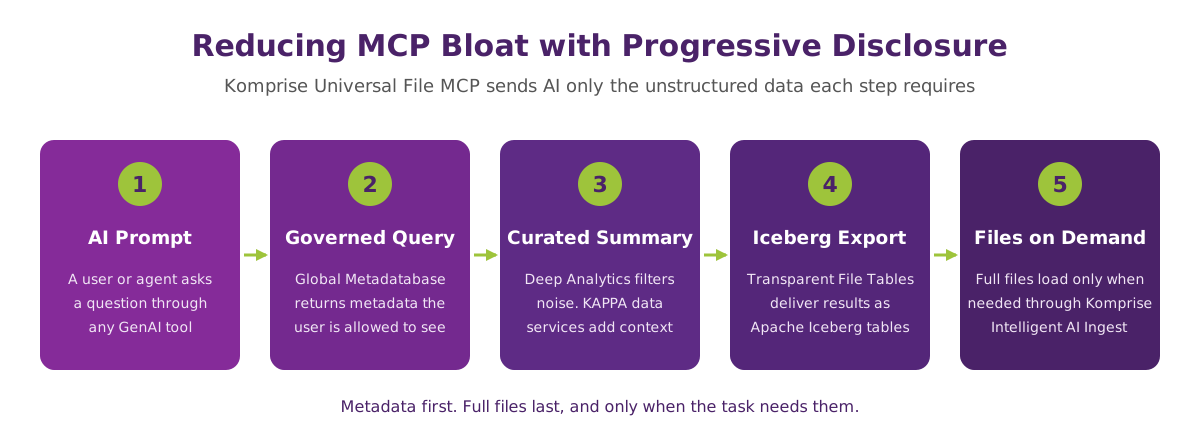
- Progressive disclosure of data, so the model starts with metadata and summaries and loads full files only when the task requires them.
Point solutions and manual scripts cover one storage system at a time and return point-in-time results. At enterprise scale, with data spread across vendors and growing every day, curation has to happen on a continuously updated index that spans every silo.
How Komprise Reduces MCP Bloat for Unstructured Data
Komprise Universal File MCP gives AI agents and LLMs one governed MCP interface to query enterprise file storage, NAS, cloud, and other unstructured data silos. Instead of passing raw listings or full files to the model, it returns only the data the task needs, enriched with context and filtered by the permissions of the user making the request.
The mechanisms behind it:
- Consistent schema across silos. The Komprise Global Metadatabase indexes file and object metadata across storage vendors and locations at petabyte scale. AI queries run against one uniform structure regardless of where the data lives, which replaces a separate connector for each storage system.
- Enriched context. KAPPA data services extract contextual metadata based on industry, enterprise, sensitivity, users, and other attributes that a specific AI use case requires, such as DICOM metadata for medical imaging.
- Noise filters. Deep Analytics removes irrelevant, outdated, conflicting, and duplicate data from results before they reach the model.
- Progressive disclosure with Transparent File Tables. Komprise Universal File MCP starts with metadata for summarization. Results export as Apache Iceberg tables through Transparent File Tables, and full files load only when needed. The model reads the least data required at each step.
- Governed, audited access. Every query is authenticated and returns results based on the privileges of the requesting user. Komprise audits what data reaches AI systems for governance and reporting.
- Access to tiered data. Transparent Move Technology keeps tiered and archived data accessible, so AI queries cover data wherever it sits in its lifecycle.
- Follow-up actions. Results from a prompt feed follow-up workflows, such as ingesting curated files into AI or lakehouses with Komprise Intelligent AI Ingest.
Example: a researcher asks an LLM to find pathology images related to a specific study within a date range. The query filters on system metadata, KAPPA-enriched DICOM metadata, and the permissions the researcher already holds. The model receives a curated result set, not a raw listing of an imaging archive.
| Evaluation Criteria | Without Curated File MCP Access | With Komprise |
|---|---|---|
| Connectors for file data | One MCP server per storage vendor or system, each adding its own tool definitions | One governed MCP interface across NAS, object, and cloud storage |
| Schema | Different structure and naming per storage system | Uniform schema from the Global Metadatabase across all silos |
| Response size | Raw file listings or full file contents flow into the context window | Metadata and summaries first, files loaded only when needed |
| Data quality | Duplicate, outdated, and conflicting files reach the model | Deep Analytics filters irrelevant, outdated, conflicting, and duplicate data |
| Context | Basic system metadata only | KAPPA data services add industry, sensitivity, user, and use case metadata |
| Permissions | Service-account access, reviewed case by case | Results filtered by the requesting user’s existing privileges |
| Audit trail | No consistent record of what data reached the model | Audited record of data delivered to AI systems |
| Tiered and archived data | Out of reach or requires rehydration | Accessible through Transparent Move Technology |
| Freshness | Point-in-time scans per system | Continuously updated index across silos |
| Downstream action | Manual export and copy | Export as Apache Iceberg tables with Transparent File Tables, ingest with Komprise Intelligent AI Ingest |
MCP Bloat Frequently Asked Questions
What is MCP bloat?
MCP bloat is the buildup of unnecessary tool definitions and oversized tool responses in an AI model’s context window when an agent connects to many Model Context Protocol servers. It raises token costs, slows responses, and lowers accuracy because the model processes tools and data it does not need.
What causes MCP bloat?
Two things cause it. First, MCP hosts often load every tool definition from every connected server at the start of a session, so the tool list grows with each new server. Second, tools return large results, such as full documents or file listings, that pass through the model even when only a small part is relevant. Enterprises that connect a separate MCP server for each storage system or application see both effects at once.
What is the difference between tool definition bloat and response bloat?
Tool definition bloat comes from the number of tools an agent can see. Each tool name, description, and schema consumes tokens before the model reads the request. Response bloat comes from the size of what tools return. A single file listing or document dump consumes more tokens than the question needs. Host-side techniques such as tool search address the first. Curating data at the source addresses the second.
How does MCP bloat affect AI accuracy and token costs?
Every token spent on irrelevant tools or data is a token the model pays for and reasons past. More tool options raise the chance the model selects the wrong tool, and noisy results raise the chance it summarizes the wrong data. McKinsey reports that about 60% of an agentic task’s cost is tied to refining answers, and bloated inputs lengthen those refinement loops.
Source: McKinsey, Is That AI Agent Worth It? Agentic Economics and the Modern Operating Model
How do you reduce MCP bloat?
On the AI host, use progressive tool discovery so tool definitions load only when needed, and programmatic tool calling so intermediate results stay out of the context window. At the data source, consolidate connectors, apply a consistent schema, filter out redundant, obsolete, and trivial (ROT) data, and return metadata and summaries before full files. Both sides matter. Host-side fixes do not shrink what a data source sends back.
What is progressive disclosure in MCP?
Progressive disclosure is the practice of giving an AI model information in stages instead of all at once. For tools, the model first sees a short catalog and loads a full tool definition only when it plans to call that tool. For data, the model first receives metadata and summaries and requests full files only when the task requires them.
Why is MCP bloat worse for unstructured data?
Unstructured data has no shared schema and spans millions to billions of files across NAS, object, and cloud storage from multiple vendors. A query against file storage returns large, noisy results with little context, and each storage vendor that publishes its own MCP server adds another set of tool definitions. Without curation and consistent metadata, an agent reads far more data than it needs to answer the question.
How does Komprise reduce MCP bloat for AI use cases?
Komprise Universal File MCP gives AI agents and LLMs one governed MCP interface across enterprise file and object storage. The Global Metadatabase provides a consistent schema across silos, KAPPA data services enrich metadata with use case context, and Deep Analytics filters out irrelevant, outdated, conflicting, and duplicate data. Results start with metadata, export as Apache Iceberg tables through Transparent File Tables, and load full files only when needed. Every response respects the permissions of the requesting user and is audited.
Does Komprise Universal File MCP respect existing file permissions?
Yes. Queries are authenticated, and results reflect the privileges and authorization level of the user making the request. Komprise also audits what data reaches AI systems, which gives security and compliance teams a record for governance and reporting.
Can AI agents query tiered or archived files through Komprise Universal File MCP?
Yes. Komprise Universal File MCP serves data as it moves. Transparent Move Technology keeps tiered and archived data accessible, so AI queries cover cold data on lower-cost storage as well as active data on primary storage. Transparent Move Technology cuts storage costs by 70% or more with no rehydration penalty.
Which layer of the AI Data Platform addresses MCP bloat?
MCP bloat shows up at layer 5, AI Delivery and Consumption, where agents and LLMs consume data. The fix sits in the layers beneath it: layer 2, Metadata and Discovery, provides a consistent index across silos; layer 3, Classification and Governance, enforces permissions and sensitivity rules; and layer 4, Enrichment and Curation, removes noise and adds context. Komprise operates at layers 2 through 4. See the AI Data Platform glossary page for the full five-layer model.