Welcome back to Office Hours. Session one covered data tiering and the storage price spike. Session two covered AI data workflows and KAPPA data services. Session three covered unstructured data migration. This is session four on Deep Analytics and the Global Metadatabase, with Benjamin Henry, Field CTO, Komprise.
Watch the recordings and/or register for the next one at komprise.com/office-hours.
The Pain: You Can’t Act on Data You Can’t Find
Nearly every Komprise use case follows the same shape: something needs to happen to a specific slice of data. Tier it, confine it, copy it to AI, delete it, and the hard part is finding that slice across petabytes of data. An age-based rule works for a first pass at cost savings, but it can’t isolate only videos, only files that might contain PII, or only data clean enough to train a model. That precision comes from searching the Global Metadatabase directly through Deep Analytics, which ships with the full platform license, not the migration-only tier.
Step One: Build a Query, Not a Filter
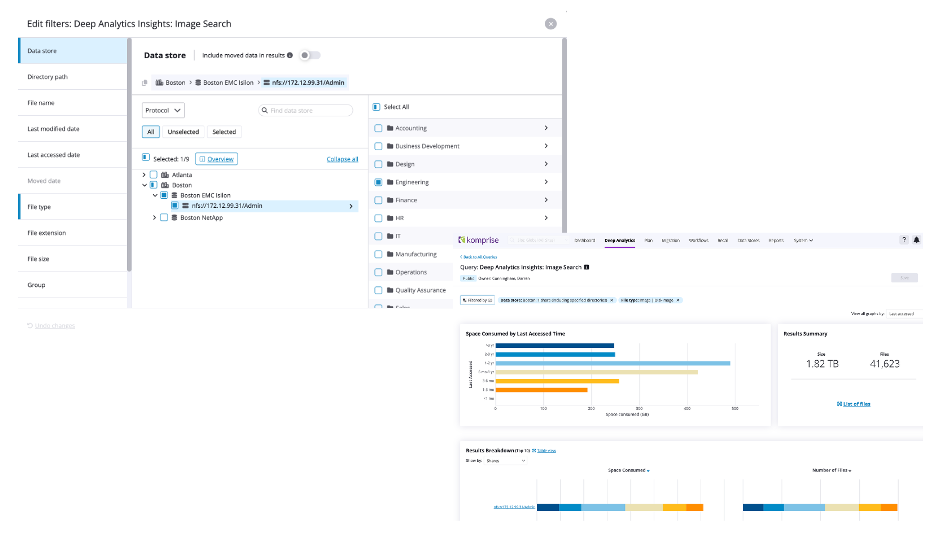
- Drill down across sites, vendors, and shares in one query. Start at a site, narrow to a cluster, a Dell PowerScale (Isilon) access zone or NetApp SVM, a share, even a subfolder, or check multiple boxes to run one query across every vendor and site at once.
- Stack filters until the data set is exactly what you need. Include or exclude modified or access date, moved-data-only, file type or extension, size range, owner or group, and Komprise tags all combine in one query.
- Every result comes with a heat map, a file list, and a CSV export. Hover any segment for size and file count, preview the file list, or download full metadata, path, dates and ownership, for use anywhere.
- Refine iteratively and save what works. A first pass at marketing videos returned 2.7TB across 60,000 files; adding “not accessed in a year or more” cut that to 1.4 TB and about 31,000 files. Save it public, so anyone in the organization can reuse it, or private.
Step Two: Put the Query to Work
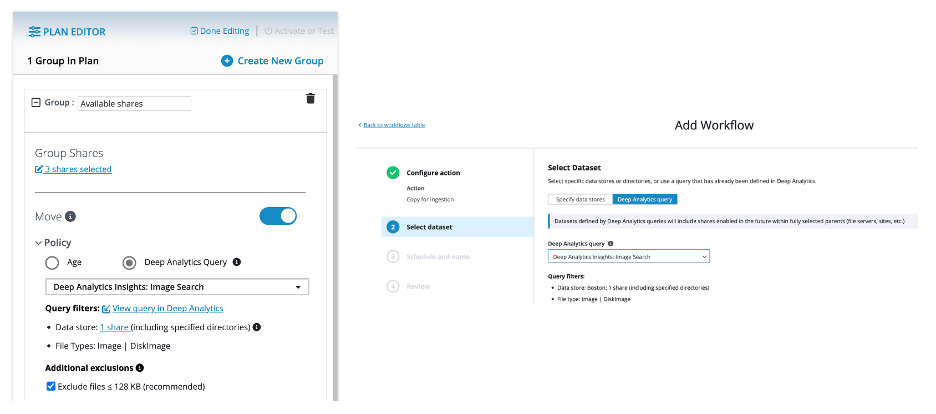
- Base a tiering plan on a query instead of an age slider. Same move action, same plan page, but the target is a saved query, not a blanket cutoff. Watch the small-file exclusion: some cloud targets don’t want files under 128KB.
- Scope an AI ingest copy to only what belongs there. You can filter to text-based types (documents, logs, presentations, spreadsheets) before copying to a bucket, so irrelevant formats never reach the training set. The copy preserves metadata and access time, converts SMB or NFS to cheaper object storage, and leaves the source untouched.
- Scan for sensitive data. Narrow to text-based files and then run one of 68 built-in content scanners, a keyword search, or a full regex for something specific, like a hospital’s medical record number forma. Automatically tag every match, with policies you set.
Step Three: Confine Is a Decision, Not a Deletion
- Query the tag, then confine what it finds. Once files are tagged, build a second query on that tag (value equals the scanner name that matched) and use it as the basis for a confine plan.
- Confine sensitive and regulated data without erasing it. Matches move to an admin-only hidden folder, with the original folder structure preserved as a breadcrumb trail. From there: sanitize, route to legal or compliance, delete, or archive to tape, all optional until someone chooses.
- Skip the scanner if you already know where the risk is. Query the known location and apply a custom tag directly. One pass against an accounting share tagged 628,000 files in the background, with live progress the whole way.
Watch an overview of the Confine function.
The Safety Net: System Queries
A saved query is a user query until it’s attached to a live plan or workflow. At that point, Komprise locks a copy as a system query, so editing the original later can’t change what an active job is doing. To change behavior, stop the plan, reselect the query and restart, which creates a fresh locked copy. The interface shows exactly which plan or workflow each query feeds.
Self-Service, Migration Prep, and the Lakehouse
- Enabling a Komprise Deep Analytics-only role limits the blast radius. Grant a researcher, data steward, or legal team access to specific shares with a query-and-tag-only role; they can’t move, confine, or delete anything. Some organizations pair this with Showback reporting, so a department head sees their own monthly storage cost and can tag their own inactive data to bring the bill down.
- Find orphaned data before you migrate it. Filter for undefined owner (identity can’t be resolved) combined with an access-date threshold to view genuinely abandoned orphaned data, rather than lifting and shifting data nobody needs at today’s storage prices.
- Hunt across vendors for what shouldn’t still exist. One query spanning multiple storage platforms, filtered to file type and an access-date cutoff, can surface stale VM images or old SQL dumps across the estate, feeding a confine plan before final disposition.
- Feed a lakehouse without a bulk copy. Every query’s metadata export already works as a CSV input to Snowflake or Databricks today. Transparent File Tables, in early access, goes further, exposing that same metadata directlyas queryable tables.
Most enterprise data is unstructured and very little of it is enriched enough for a lakehouse or an AI pipeline to use without pre-processing. Training a model on everything in a share is garbage in, garbage out. The Global Metadatabase is what lets a team mine down to the subset worthy of training.
Key Takeaways
- Age-based tiering is a starting point, not a ceiling. A saved query gets you surgical when the target is specific.
- Confine before you act. Ring-fencing sensitive or stale data buys a review window before anyone deletes anything.
- System queries protect live jobs. A locked copy means editing a saved query can’t change what a plan or workflow is doing.
- Self-service. Deep Analytics access scales good decisions. Give end users query-and-tag power without giving them the ability to move or delete data.
Read more Office Hours blog posts:
- Komprise Intelligent Tiering: 3 Steps to ROI
- Komprise Smart Data Workflows: 3 Steps to AI-Ready Data
- Komprise Elastic Data Migration: 3 Steps to Lower Risks
Watch all of the recordings and register for the next one at komprise.com/office-hours.